Xbox Cloud Gaming lets you test your phone as a controller, plus Nano cloud connect
Kingfish737··2 min read
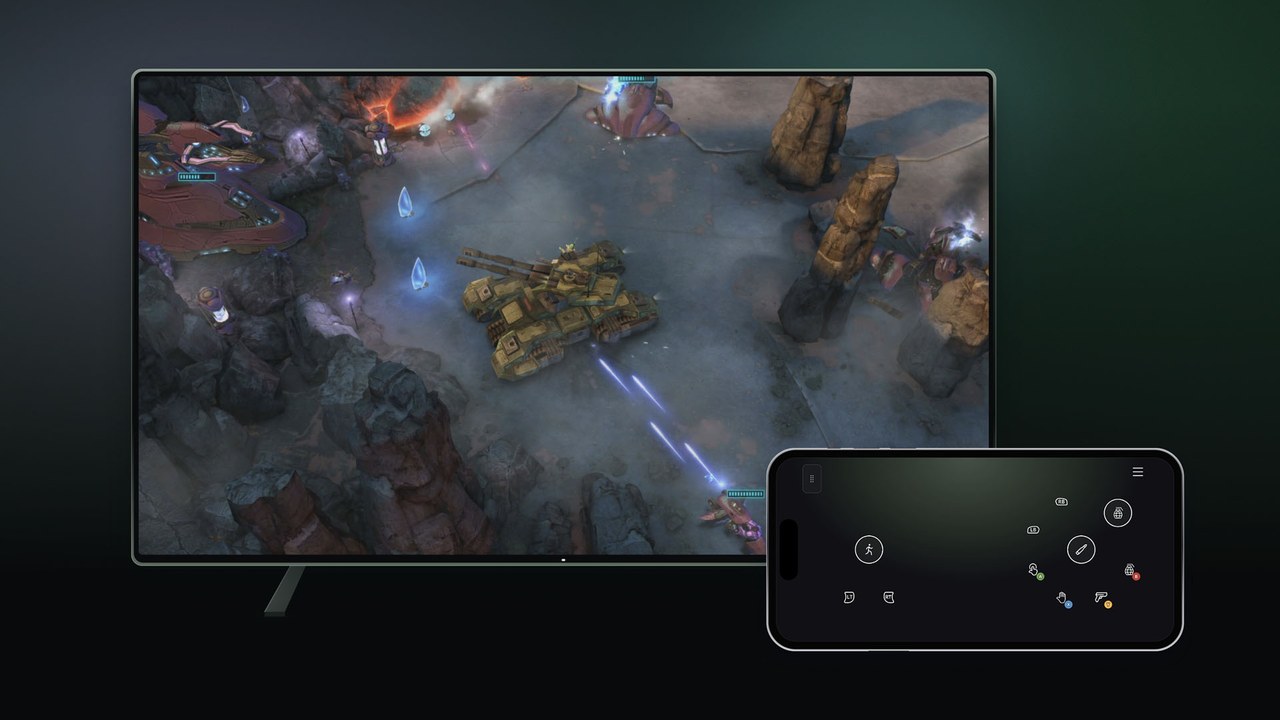
No controller on the couch? Not a problem anymore, at least in preview. Starting today, Xbox Cloud Gaming is testing two new ways to play: your phone as a controller on Smart TVs, and cloud connect for the Xbox Nano Controller in the U.S. (Xbox Wire).
Your phone as a controller
How it works: on a supported Smart TV, a supported Android or iOS phone becomes the controller. The controls open in your phone’s browser, and some games get layouts tailored to them.
Turn it on: go to Settings > Account and switch on Preview Features in the latest supported Smart TV app. Launch a game without a controller connected and you’ll get the option to use your phone.
Where: rolling out today on supported TVs in countries where Xbox Cloud Gaming is available.
Cloud connect for the Xbox Nano Controller (U.S.)
The idea: instead of Bluetooth to your TV, the Nano connects over your Wi-Fi straight to the cloud server running your game, which can cut input lag.
Setup: use the Xbox beta app on Android, or the Xbox Accessories app on PC (Xbox Insider enrollment required for the PC route), then connect the controller to Wi-Fi and sign in with the same account (setup guide).
Where it works for now: supported Smart TVs and the web. It won’t work with every cloud experience yet.
Both are early tests, so supported games and devices may be limited, and Xbox is asking for feedback from inside each preview.
Koffee take: phone-as-controller is a real fix for the “guest at the TV” problem, and direct-to-cloud Wi-Fi is exactly how cloud controllers should work.
Filed Nov 4, 2026 ~4:15 PM CT — Afternoon pass. Sources: Xbox Wire (Nov 4, 2026). Card image: official image from Xbox Wire.
Xbox Cloud GamingXbox Nano ControllerSmart TVPreview