
Microsoft’s Auto SR leaves preview on ROG Xbox Ally handhelds, now undocked
Your Ally just got a free glow-up. Microsoft’s Automatic Super Resolution (Auto SR), its AI upscaler and answer to Nvidia’s DLSS, is officially out of preview on the ROG Xbox Ally X and ROG Xbox Ally X20, and it’s expanding to select Copilot+ PCs powered by AMD Ryzen, Microsoft said on November 10 (DirectX Developer Blog, The Verge).
What’s new
- Handheld mode: the Insider preview only worked docked. Now Auto SR runs on the built-in screen, even unplugged on battery.
- 1080p support: no more dropping a game’s resolution first. Docked to a bigger display, it can upscale up to 1440p.
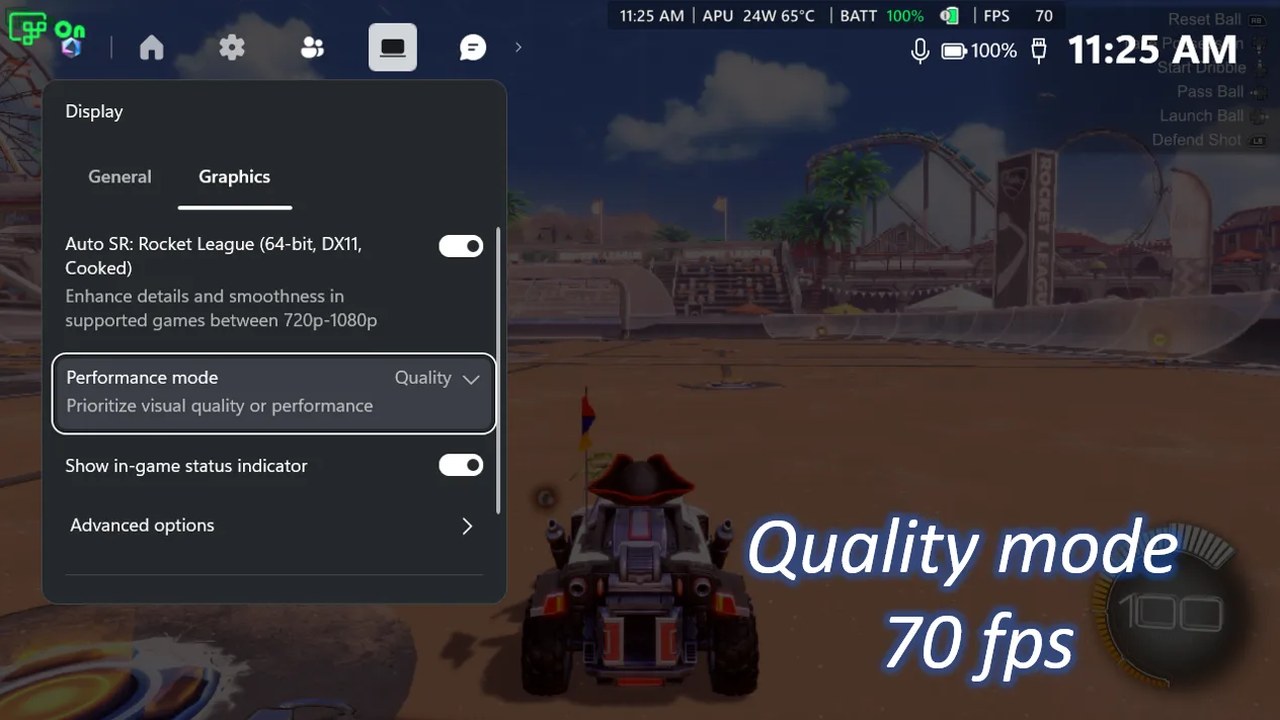
- Performance Mode: raises the cap from around 60–75 FPS to up to 120 FPS. In Microsoft’s Rocket League test, Quality averaged 70 FPS and Performance 115.
- Auto HDR: now works alongside Auto SR instead of one or the other.
Handheld play, 1080p support and the AMD Copilot+ PC expansion are live now. Performance Mode and Auto HDR support roll out through Windows updates, so they may take a little while to show up. Microsoft notes 1080p in handheld mode “may not be as optimal” for performance, though older games should still look sharper.
How to turn it on
Update Game Bar and Windows 11, grab the Auto Super Resolution package from the Microsoft Store, then press the Xbox button and go to Widgets > Display > Graphics to pick Quality or Performance.
Koffee take: a 120 FPS mode on a handheld is the headline, but undocked support is the one Ally owners actually asked for.
Filed Nov 11, 2026 ~8:30 PM CT — Evening pass. Sources: DirectX Developer Blog — Auto SR Officially Launches on ROG Xbox Ally X and X20 (Stefan Bojanic, Nov 10, 2026) · The Verge (Jay Peters, Nov 10, 2026). Card image: official Microsoft screenshot.